How to Create Quiz Forms That Generate Leads: Complete 2025 Guide
Quiz forms have emerged as one of the most powerful lead generation tools in digital marketing. Unlike static lead magnets that offer a one-way value exchange, quizzes create an interactive experience that engages users while collecting valuable data about their preferences, needs, and pain points.
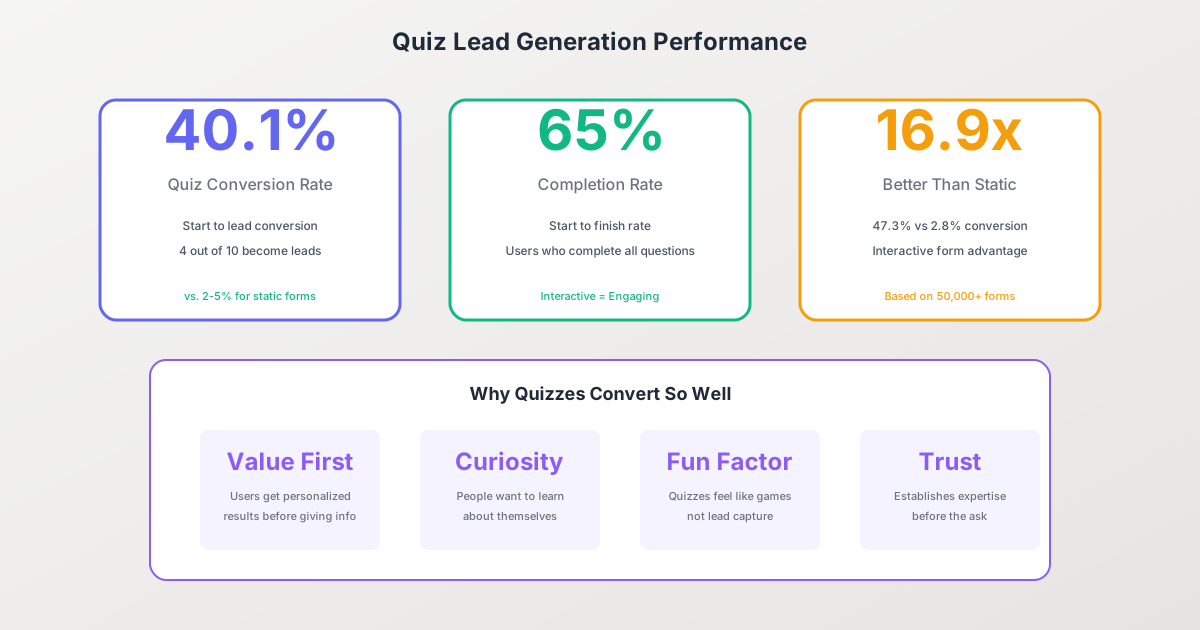
The numbers speak for themselves: quiz forms achieve an average 40.1% conversion rate from start to lead capture, compared to just 2-3% for traditional landing pages. That’s approximately 16.9 times more effective than static content at generating leads. In this comprehensive guide, you’ll learn how to create quiz forms that not only capture attention but convert visitors into qualified leads for your business.
Why Quiz Forms Outperform Traditional Lead Magnets
Before diving into the how-to, let’s understand why quizzes work so well for lead generation:
The Psychology Behind Quiz Engagement
Self-discovery drives participation. People have an inherent desire to learn about themselves. Whether it’s “What type of entrepreneur are you?” or “How healthy is your website?”, quizzes tap into our natural curiosity about our own traits, abilities, and potential.
Commitment and consistency principle. Once someone starts a quiz, they’ve made a small psychological commitment. Research from Robert Cialdini’s work on persuasion shows that people who take small actions are significantly more likely to take larger ones. Completing question after question builds investment in seeing the results.
Personalized value exchange. Unlike downloading a generic ebook, quiz takers receive personalized insights based on their specific answers. This customization makes the lead capture feel more like a fair trade—they’re getting something tailored to them.
Quiz Forms vs. Other Lead Magnets: The Data
| Lead Magnet Type | Average Conversion Rate | Lead Quality |
|---|---|---|
| Quiz/Assessment | 40.1% | High (segmented) |
| Calculator/Tool | 25-35% | High |
| Free Trial | 15-25% | Very High |
| Webinar Registration | 20-30% | Medium-High |
| Ebook/Whitepaper | 5-15% | Medium |
| Newsletter Signup | 1-5% | Low-Medium |
The data shows that quizzes not only convert at higher rates but also provide segmented leads with detailed qualification data—information you simply can’t get from a PDF download.
Types of Lead Generation Quizzes
Different quiz formats serve different business goals. Choosing the right type is crucial for maximizing both engagement and lead quality.
Personality Quizzes
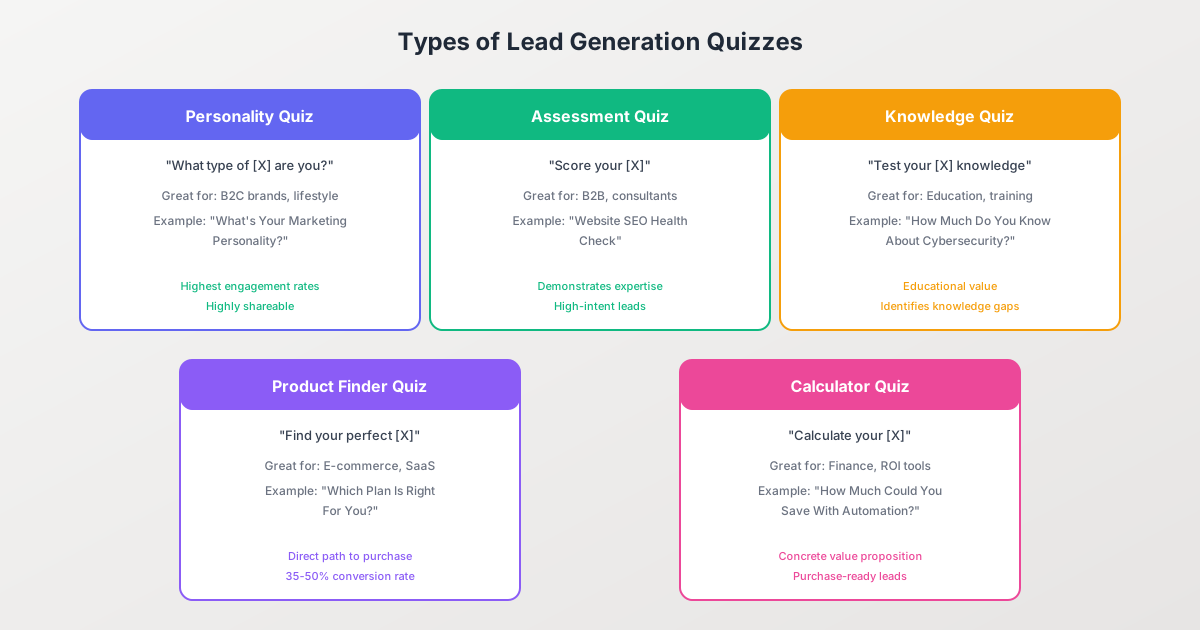
Format: “What type of [X] are you?”
Best for: B2C brands, lifestyle businesses, coaches, and content creators
Example titles:
- “What’s Your Marketing Personality Type?”
- “Which Leadership Style Matches You?”
- “What Kind of Traveler Are You?”
Why they work: Personality quizzes have the highest shareability because people love sharing their results on social media. They tap into identity and self-expression, making them highly engaging. BuzzFeed built much of their viral success on this format.
Lead quality consideration: While personality quizzes generate high volume, lead quality can vary. The key is designing personality types that align with your product offerings or service packages.
Assessment Quizzes
Format: “Score your [X]” or “How healthy is your [X]?”
Best for: B2B companies, consultants, agencies, and SaaS businesses
Example titles:
- “Website SEO Health Check”
- “Marketing Strategy Maturity Assessment”
- “Financial Wellness Score”
Why they work: Assessment quizzes demonstrate your expertise while identifying gaps or problems the quiz taker may not have known they had. This positions your product or service as the solution.
Lead quality consideration: Assessment quizzes typically generate the highest-intent leads because participants are actively evaluating an area where they may need help.
Knowledge Quizzes
Format: “Test your [X] knowledge” or “How much do you know about [X]?”
Best for: Educational institutions, training companies, certification programs
Example titles:
- “How Much Do You Know About Cybersecurity?”
- “Test Your Digital Marketing IQ”
- “Project Management Knowledge Check”
Why they work: Knowledge quizzes create awareness of skill gaps, making quiz takers more receptive to educational offerings. They also position your brand as an authority in the subject matter.
Product Finder Quizzes
Format: “Find your perfect [X]” or “Which [X] is right for you?”
Best for: E-commerce stores, SaaS companies, service businesses
Example titles:
- “Which Skincare Routine Is Right for Your Skin Type?”
- “Find Your Perfect Running Shoe”
- “Which Pricing Plan Fits Your Business?”
Why they work: Product finder quizzes guide customers through a decision-making process, reducing choice paralysis and increasing purchase confidence. They achieve 35-50% conversion rates to purchase when well-designed.
Calculator Quizzes
Format: “Calculate your [X]” or “How much could you [save/earn/improve]?”
Best for: Financial services, B2B software, ROI-focused businesses
Example titles:
- “Calculate Your Retirement Readiness Score”
- “How Much Could You Save With Marketing Automation?”
- “Estimate Your Home’s Solar Potential”
Why they work: Calculator quizzes provide concrete, personalized numbers that quantify the value proposition. They create purchase-ready leads by demonstrating specific potential outcomes.
Optimal Quiz Structure
A well-structured quiz guides participants smoothly from engagement to conversion. Here’s the proven framework:
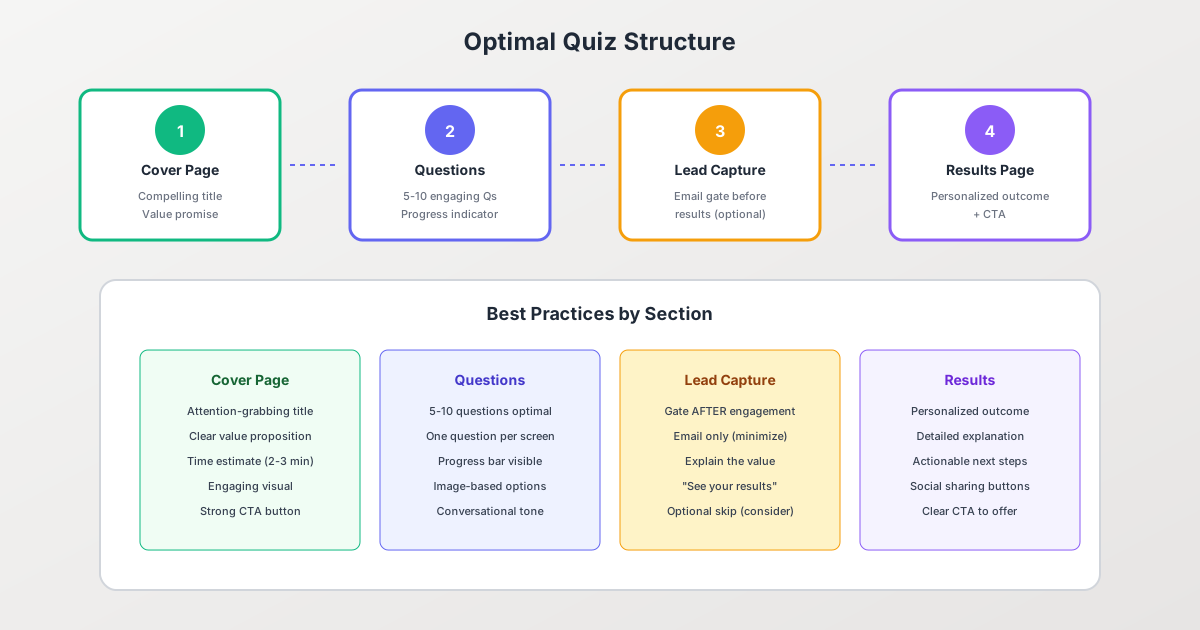
1. The Cover Page (Landing Page)
Your cover page has one job: convince visitors to start the quiz. It should include:
Attention-grabbing title: Use curiosity, self-interest, or challenge. Examples:
- “Discover Your Hidden Marketing Superpower” (curiosity)
- “Are You Making These 7 Landing Page Mistakes?” (challenge)
- “Find Out Which Strategy Will Double Your Revenue” (self-interest)
Clear value proposition: What will they learn? Why does it matter?
Time estimate: Set expectations with “Takes 2-3 minutes”
Engaging visual: A relevant image or illustration that sets the tone
Strong CTA button: Use action-oriented text like “Start the Quiz,” “Discover Now,” or “Find Out”
2. The Questions (5-10 is Optimal)
Research shows that 5-10 questions is the sweet spot for quiz completion. Here’s why:
- Fewer than 5 questions: Results feel shallow and not personalized enough
- 5-10 questions: 65%+ completion rate with meaningful data collection
- More than 10 questions: Completion rates drop significantly; only use for high-value assessments
Question design best practices:
One question per screen. This creates a sense of progress and reduces overwhelm. Each click forward represents a micro-commitment.
Show progress indicators. A progress bar or “Question 3 of 7” notation reduces uncertainty and encourages completion.
Use image-based options when possible. Visual answer choices increase engagement by 35% compared to text-only options.
Keep a conversational tone. Write questions as if you’re having a friendly conversation, not administering a test.
Mix question types: Combine multiple choice, image selection, and sliding scales to maintain interest.
3. Lead Capture Page
The lead capture page is where the magic happens—and where many quizzes lose potential leads. Placement and messaging are critical.
When to capture the lead:
- Before results (gate): Highest lead capture rate (70-80% of completers)
- On results page: Balanced approach (50-60% capture rate)
- Optional/no gate: Best user experience but lowest capture (20-30%)
Lead capture best practices:
Ask for email only. Every additional field reduces conversion by 4-5%. You can gather name and other details later or from quiz answers.
Explain the value: “Enter your email to see your personalized results and get actionable tips”
Consider a skip option: While this reduces capture rate, it improves brand perception and lead quality. Those who choose to provide email are more interested.
4. Results Page
The results page is your opportunity to deliver value, build trust, and guide the next action.
Elements of an effective results page:
- Personalized headline with their result type
- Positive framing (even for “lower” scores)
- Detailed explanation of what the result means
- Actionable next steps or recommendations
- Clear CTA connected to your offering
- Social sharing buttons
Lead Capture Strategies: Finding the Right Balance
The decision of how and when to capture leads significantly impacts both conversion rate and user experience.
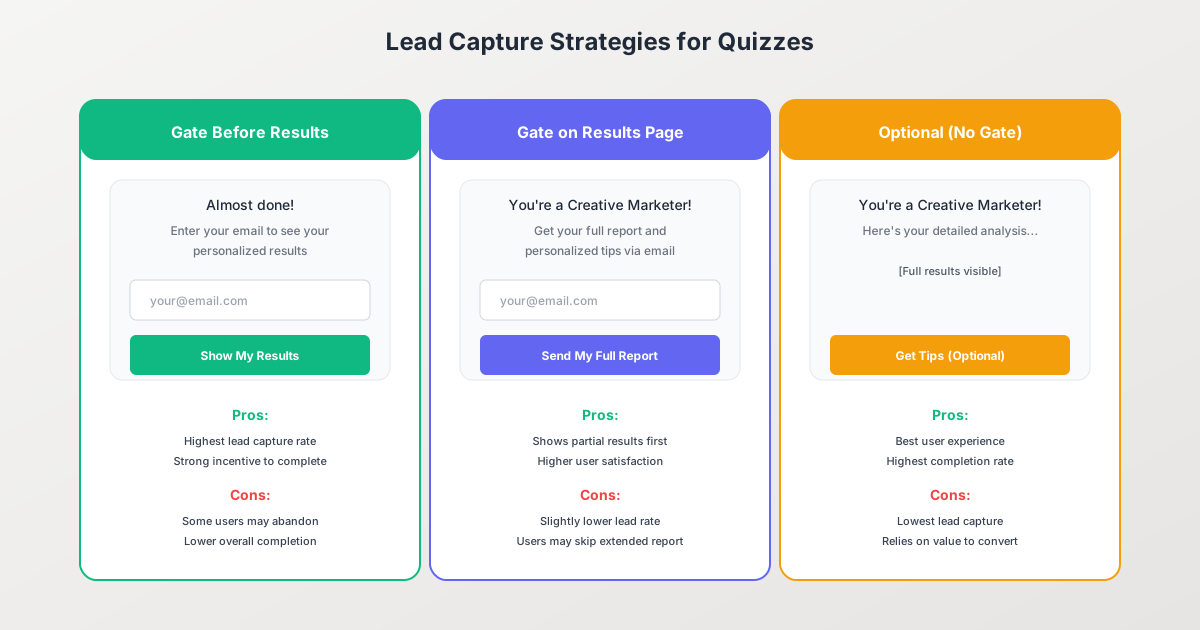
Strategy 1: Gate Before Results
How it works: After completing all questions, users must enter their email to see their results.
Conversion rate: 70-80% of quiz completers provide email
Pros:
- Highest lead capture rate
- Strong incentive to complete the exchange
- Clear value proposition (“see your results”)
Cons:
- Some users will abandon at the gate
- Can feel manipulative if results aren’t valuable
- May generate lower-quality leads (people entering fake emails)
Best for: High-value assessments, B2B lead generation, businesses prioritizing volume
Strategy 2: Gate on Results Page
How it works: Show basic results immediately, but offer expanded insights, a detailed report, or follow-up content for email signup.
Conversion rate: 50-60% of quiz completers provide email
Pros:
- Better user experience—they see something immediately
- Higher lead quality (they’re opting in for more value)
- Builds trust before asking for information
Cons:
- Lower overall capture rate
- Some users satisfied with basic results won’t opt in
- Requires creating additional valuable content for the “extended” version
Best for: Content marketing, building long-term relationships, quality over quantity
Strategy 3: Optional or No Gate
How it works: Show full results without requiring email. Offer optional signup for related content.
Conversion rate: 20-30% of quiz completers provide email
Pros:
- Best user experience
- Highest quiz completion rate
- Only highly interested leads opt in
- Best for brand building and social sharing
Cons:
- Lowest lead capture rate
- Relies heavily on the quality of the optional offer
- May not meet volume goals
Best for: Brand awareness campaigns, viral quizzes, audiences sensitive to data collection
Designing Effective Quiz Results
Your results page can make or break the quiz experience. It’s where you deliver on the promise and guide users toward becoming customers.
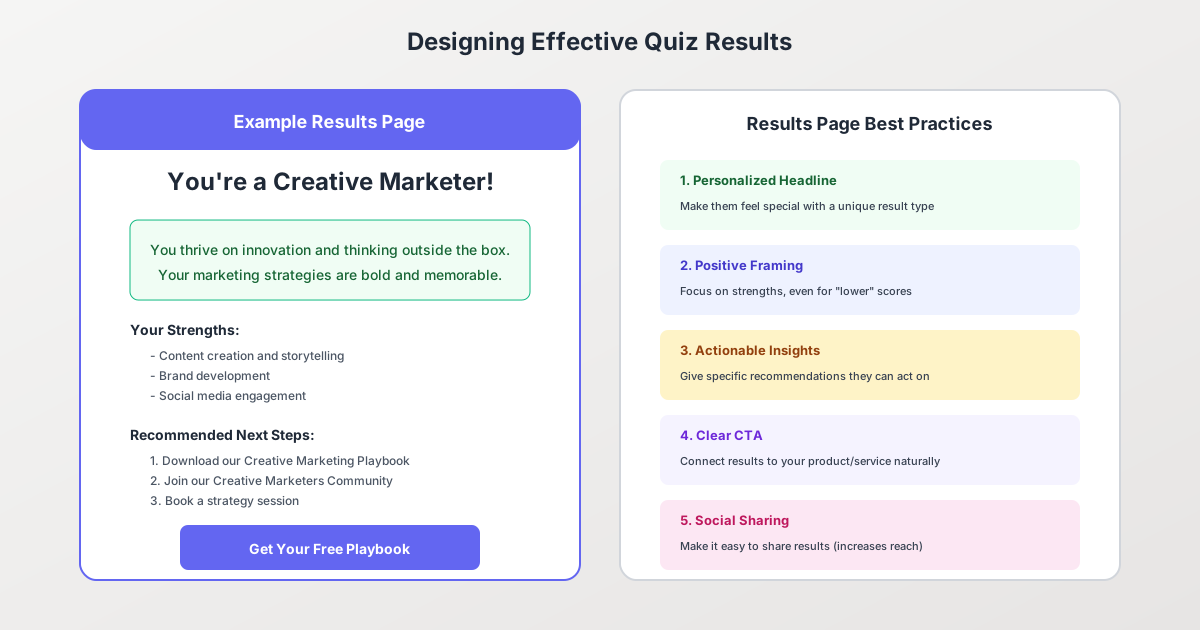
The Anatomy of a High-Converting Results Page
1. Personalized Headline Make them feel special with a unique result. “You’re a Creative Marketer!” feels more valuable than “Result: Type B.”
2. Positive Framing Even for “lower” scores, focus on strengths first. Nobody wants to feel bad about their quiz results. Frame challenges as opportunities.
3. Detailed Explanation Go beyond a one-liner. Explain what this result means in practical terms. What are their strengths? What challenges might they face?
4. Actionable Insights Give specific recommendations they can implement immediately. This builds trust and demonstrates your expertise.
5. Clear CTA Connected to Your Offering Connect the results to your product or service naturally:
- Personality quiz: “As a Creative Marketer, you’ll love our visual campaign builder”
- Assessment quiz: “Your score indicates room for improvement. Book a free consultation”
- Product finder: “Based on your answers, we recommend the Pro Plan”
6. Social Sharing Options Make it easy to share results. Create shareable result graphics optimized for social platforms. Shared results = free marketing.
Result Types: How Many Should You Have?
3-5 result types is typically optimal:
- Fewer than 3: Results feel generic
- 3-5: Each feels distinct and memorable
- More than 5: Harder to create meaningful differentiation
Each result type should:
- Have a memorable name
- Represent a clear archetype or category
- Connect to a specific product/service/content recommendation
- Include distinct strengths and growth areas
Promoting Your Quiz for Maximum Reach
Creating a great quiz is only half the battle. Strategic promotion determines whether it generates 100 leads or 10,000.
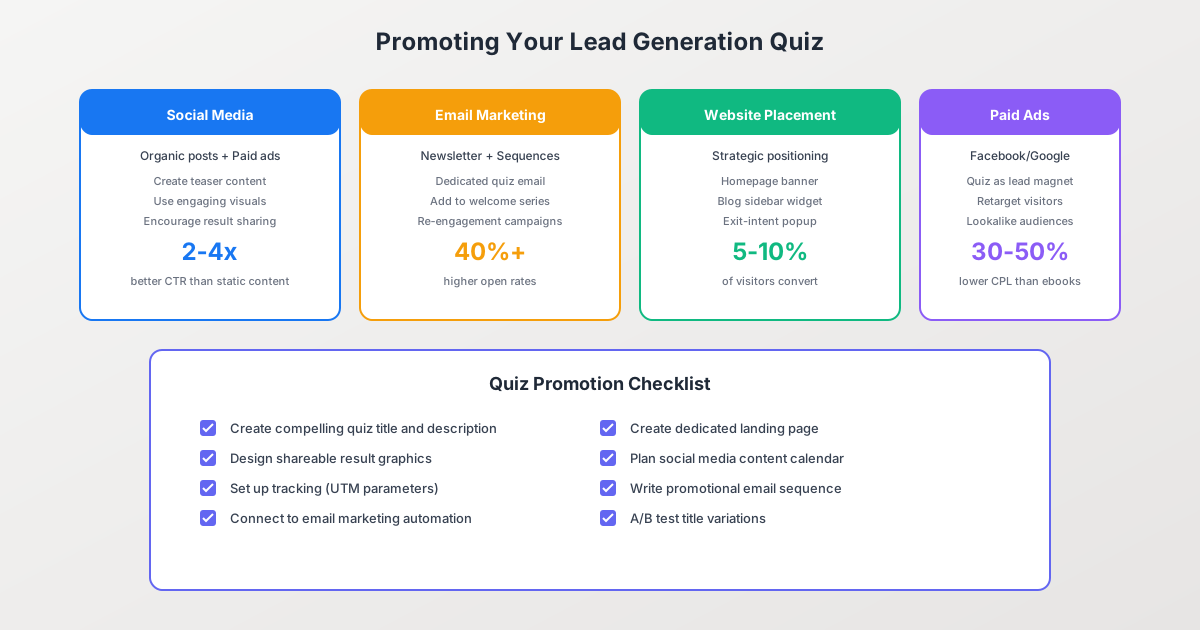
Social Media Promotion
Organic social strategies:
- Create teaser content that hints at possible results
- Share interesting statistics from quiz data (without spoilers)
- Encourage result sharing with branded graphics
- Use relevant hashtags and tag relevant accounts
Why it works: Quiz posts see 2-4x higher click-through rates than static content on social platforms.
Paid social advertising:
- Use quiz as a lead magnet in Facebook/Instagram ads
- Retarget website visitors with quiz promotions
- Create lookalike audiences from quiz completers
- Test multiple ad creatives highlighting different aspects
Pro tip: Quiz ads typically achieve 30-50% lower cost-per-lead than ebook or whitepaper offers.
Email Marketing
Newsletter promotion:
- Send a dedicated email announcing the quiz
- Include quiz link in email signatures
- Add quiz to automated welcome sequences
Re-engagement campaigns:
- Use quizzes to re-engage inactive subscribers
- Quiz emails see 40%+ higher open rates than standard newsletters
Website Placement
High-impact placements:
- Homepage banner or hero section
- Blog sidebar widget
- Exit-intent popup
- Dedicated landing page
- In-content embeds on relevant articles
Conversion benchmarks: Strategic website placement typically converts 5-10% of visitors into quiz starters.
Partnerships and Guest Content
- Partner with complementary brands to cross-promote
- Create co-branded quizzes for partner audiences
- Guest post with quiz embeds
- Include quiz in podcast/webinar follow-ups
Measuring Quiz Success
Track these metrics to optimize your quiz performance:
Key Performance Indicators (KPIs)
| Metric | Good | Great | Excellent |
|---|---|---|---|
| Quiz start rate | 20% | 35% | 50%+ |
| Completion rate | 50% | 65% | 80%+ |
| Lead capture rate | 40% | 60% | 75%+ |
| Overall conversion | 5% | 15% | 25%+ |
| Social shares | 2% | 5% | 10%+ |
What to Test and Optimize
Cover page: Test headlines, images, and CTA button text
Questions: Test question order, wording, and answer options
Lead capture: Test gate placement, form fields, and value messaging
Results: Test result names, descriptions, and CTAs
Promotion: Test channels, ad creatives, and timing
Common Quiz Mistakes to Avoid
1. Too Many Questions
Keep it to 5-10 questions maximum. Every additional question beyond 10 drops completion rates by approximately 5%.
2. Generic Results
“You’re Result A” isn’t engaging. Create memorable, descriptive result types that people want to share.
3. Asking for Too Much Information
Email-only captures convert 30-40% higher than forms requesting name, company, and phone number.
4. Weak Results Page
If quiz takers feel their results aren’t valuable or personalized, they won’t trust your brand or purchase from you.
5. No Clear Next Step
Every quiz should guide users toward a logical next action—whether that’s scheduling a call, exploring products, or downloading content.
6. Forgetting Mobile Users
Over 60% of quiz traffic comes from mobile devices. Ensure your quiz is fully responsive with large, tap-friendly buttons.
Building Your Quiz with Pixelform
Pixelform’s form builder makes creating professional quiz forms straightforward:
- Choose your quiz type: Start with personality, assessment, or product finder templates
- Add engaging questions: Use our drag-and-drop editor with image options
- Configure scoring logic: Set up result calculations based on answer weights
- Design your results pages: Create compelling result pages with personalized content
- Set up lead capture: Choose your gating strategy and customize the form
- Connect integrations: Send leads to your CRM, email marketing tool, or automation platform
- Publish and promote: Get a shareable link or embed on your website
Frequently Asked Questions
How many questions should my quiz have?
The optimal range is 5-10 questions. Research shows this range achieves the best balance between gathering enough information for meaningful results while maintaining high completion rates (65%+). Quizzes with fewer than 5 questions often produce results that feel superficial, while those exceeding 10-12 questions see significant abandonment.
Should I require email to see results?
It depends on your goals. Requiring email before showing results (gating) produces the highest lead capture rate (70-80% of completers) but may reduce overall completion. Showing basic results with optional email for extended insights provides a better user experience with moderate capture rates (50-60%). Choose based on whether you’re prioritizing volume or user experience.
What’s a good quiz conversion rate?
A good overall conversion rate (visitors who become leads) is 15-25%. However, this comprises multiple stages: quiz start rate (target 35%+), completion rate (target 65%+), and lead capture rate (target 60%+). If your overall conversion is below 10%, analyze each stage to identify the bottleneck.
How do I come up with quiz questions?
Start with your result types and work backward. What questions would differentiate someone who should get Result A from Result B? Focus on questions that reveal preferences, behaviors, or challenges relevant to your offering. Avoid overly personal questions early in the quiz—save those for after trust is established.
Can quizzes work for B2B lead generation?
Absolutely. Assessment quizzes work exceptionally well for B2B. Examples include “How Mature Is Your Marketing Strategy?”, “Website Security Assessment”, or “Digital Transformation Readiness Score.” These demonstrate expertise while identifying problems your service can solve. B2B quizzes often generate higher-quality leads than B2C because participants are actively evaluating their business needs.
How do I make my quiz shareable?
Create visually appealing result graphics sized for social platforms (1200x630 pixels for Facebook/LinkedIn, 1080x1080 for Instagram). Give result types memorable, share-worthy names. Include easy social sharing buttons on the results page. Consider what would make someone proud or entertained enough to share their result with their network.
What’s the best platform to host my quiz?
Choose a platform that offers: flexible question types, conditional logic, mobile responsiveness, integration with your existing tools (CRM, email marketing), customizable design, and analytics. Pixelform provides all these features with an intuitive drag-and-drop interface, making it easy to create professional quizzes without technical expertise.
Conclusion
Quiz forms represent one of the highest-converting lead generation strategies available today. With an average 40.1% conversion rate—16.9 times better than static content—quizzes deserve a place in every marketer’s toolkit.
The key to quiz success lies in thoughtful design: choosing the right quiz type for your audience, crafting engaging questions, strategically placing lead capture, and delivering genuinely valuable results. When done well, quizzes don’t just generate leads—they create memorable brand experiences that build trust and drive long-term customer relationships.
Start with a simple personality or assessment quiz, measure your results, and iterate. The data you gather from quiz responses will not only improve your lead quality but provide invaluable insights into your audience’s needs, preferences, and pain points.
Ready to create your first quiz? Get started with Pixelform and build an engaging quiz form in minutes.
Ready to build better forms? Try Pixelform free → — 1,000 responses/month on the Starter plan, all features included, cancel anytime.