E-commerce Forms: Product Requests & Returns
Key Takeaways
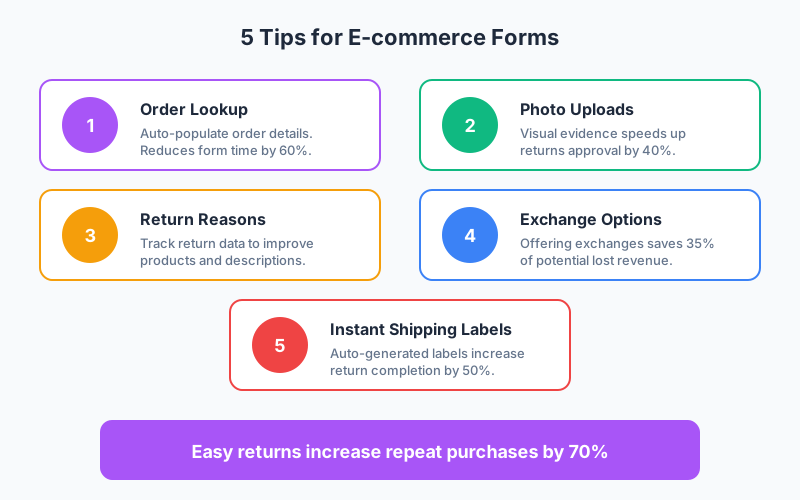
- Easy returns increase repeat purchases by 70% according to e-commerce customer experience studies
- Order lookup functionality reduces form completion time by 60% by auto-populating customer and product data
- Photo uploads speed returns approval by 40% when customers can show product condition visually
- Offering exchange options saves 35% of potentially lost revenue by converting refunds into new sales
Returns, product inquiries, and customer support requests are inevitable in e-commerce. How you handle these interactions directly impacts customer lifetime value. According to Narvar, 96% of consumers would shop again with a retailer that made returns easy, while 33% would abandon a brand entirely after a difficult return experience.
In this guide, we’ll explore the essential e-commerce forms that keep customers happy while streamlining your operations.
Why E-commerce Forms Matter
Customer experience extends far beyond the purchase. Post-purchase interactions often determine whether a customer returns or churns.
The cost of poor forms:
- Frustrated customers contact support (expensive)
- Returns get abandoned (inventory limbo)
- Product issues go unreported (quality blindspots)
- Opportunities for recovery are missed (lost revenue)
The value of optimized forms:
- Self-service reduces support load
- Structured data improves processing speed
- Customer feedback informs product decisions
- Professional experience builds brand loyalty
According to Shopify research, stores with streamlined return processes see 40% higher customer retention rates.
Essential E-commerce Forms
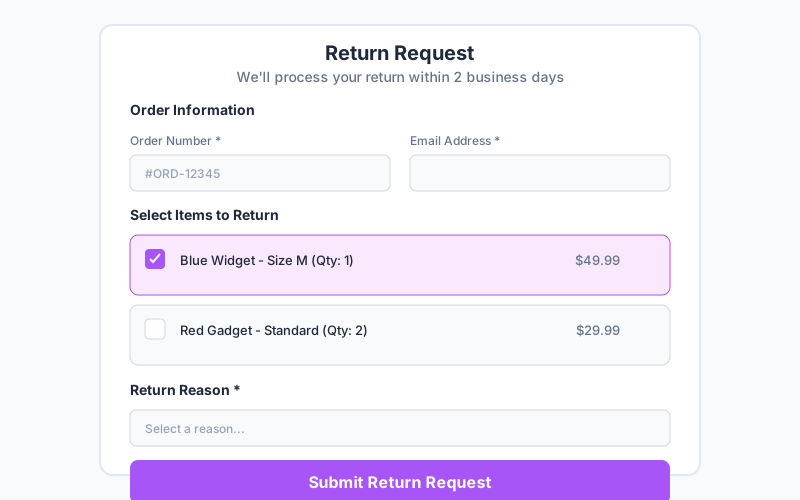
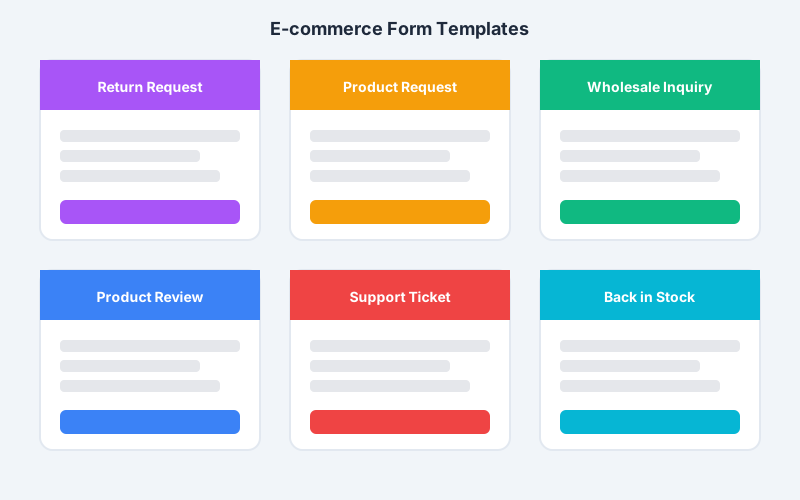
1. Return and Refund Request Form
Returns are your biggest opportunity to retain customers. Make the process painless.
Order identification:
- Order number (with lookup functionality)
- Email address for verification
- Automatic order details population
Item selection:
- Display all items from order
- Checkbox selection for return items
- Quantity selector if multiples purchased
- Show item images for clarity
Return reason:
- Dropdown with structured reasons
- Conditional follow-up questions
- Free text for additional details
- Option to upload photos
Resolution preference:
- Refund to original payment
- Store credit (often with bonus)
- Exchange for different size/color
- Exchange for different product
Return method:
- Prepaid shipping label
- Drop-off locations
- Carrier pickup scheduling
2. Product Request Form
When customers can’t find what they want, capture that demand.
Product description:
- What are they looking for?
- Specific features needed
- Price range acceptable
- Urgency level
Contact information:
- Email for notification when available
- Optional phone for high-value requests
- Preferred contact method
Follow-up preferences:
- Notify when in stock
- Suggest alternatives
- Newsletter subscription option
This data is valuable for:
- Inventory planning
- Product development
- Marketing segmentation
- Demand forecasting
3. Back-in-Stock Notification Form
Convert stockouts into future sales.
Simple capture:
- Product identifier (auto-filled)
- Email address
- Optional quantity needed
- Urgency indication
Post-submission:
- Confirmation of signup
- Estimated restock timeline if known
- Suggest available alternatives
- Related product recommendations
4. Wholesale and Bulk Inquiry Form
B2B customers require different treatment than consumers.
Business information:
- Company name and type
- Tax ID / reseller certificate
- Website or social presence
- Years in business
Order specifications:
- Products of interest
- Estimated quantities
- Order frequency
- Special requirements
Decision timeline:
- Ready to order immediately
- Gathering information
- Planning future purchase
- Just exploring options
5. Product Review Form
Reviews drive conversions. Make leaving reviews easy.
Rating components:
- Overall star rating
- Specific criteria (quality, value, fit)
- Would recommend (yes/no)
Written review:
- Review title
- Detailed feedback
- Pros and cons format
Media uploads:
- Photo of product in use
- Video testimonial
- Before/after images
Reviewer verification:
- Order number for verified badge
- Display name preference
- Location (optional)
Optimizing Your Returns Process
Making Returns Friction-Free
Auto-populate everything possible:
- Fetch order details from order number
- Pre-fill customer information
- Show purchased items with images
- Display original prices and quantities
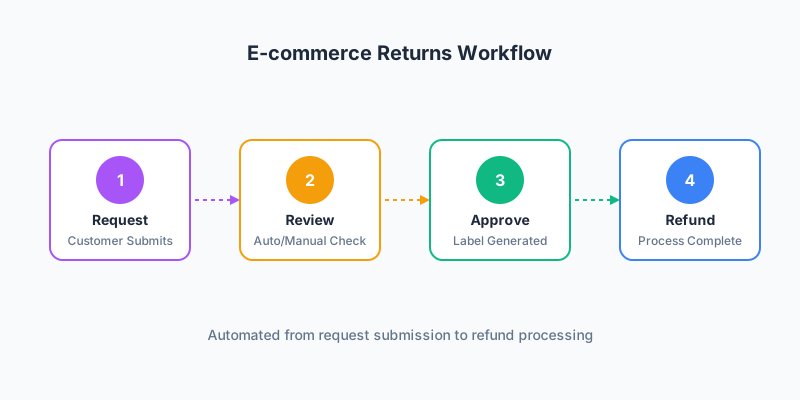
Offer instant decisions:
- Auto-approve returns within policy
- Generate shipping labels immediately
- Provide drop-off options
- Enable print-free returns
Tracking Return Reasons
Capture structured return reason data:
| Reason Category | Specific Reasons | Actions |
|---|---|---|
| Fit/Size | Too small, too large, inconsistent sizing | Update size guides |
| Quality | Defective, poor materials, not as described | Quality control review |
| Changed Mind | No longer needed, found elsewhere, impulse purchase | Marketing timing |
| Description | Didn’t match photos, wrong color, missing features | Update product pages |
| Shipping | Damaged in transit, wrong item, late delivery | Carrier/fulfillment review |
This data is gold for operations improvement.
Exchange Over Refund
Exchanges retain revenue. Encourage them:
- Offer free shipping on exchanges
- Provide store credit bonus vs refund
- Suggest popular alternatives
- Enable instant exchange processing
According to Loop Returns, offering exchange options saves 35% of revenue that would otherwise be refunded.
Product Inquiry Forms
Capturing Customer Intent
Not finding a product is a signal, not a dead end.
Request form strategy:
- Make the form visible on search no-results pages
- Add to out-of-stock product pages
- Include in 404 page design
- Feature in email for abandoned searches
Data to capture:
- Natural language product description
- Category if known
- Price range expectations
- Urgency and use case
Converting Requests to Sales
Follow-up sequences for product requests:
Immediate response:
- Acknowledge the request
- Provide estimated response time
- Suggest similar available products
- Offer alert signup if not currently available
Short-term follow-up (1-3 days):
- Curated alternatives from your catalog
- Related products they might consider
- Discount code for alternative purchase
When product becomes available:
- Priority notification
- Limited-time offer for requesters
- Easy one-click purchase
Support Request Forms
Structuring Support Tickets
Help customers help themselves:
Category selection:
- Order and shipping
- Returns and refunds
- Product questions
- Technical issues
- Billing and payments
- Other
Smart conditional logic:
- Order-related? Request order number
- Product-related? Ask for product name
- Technical? Request device and browser
- Billing? Require account verification
Urgency assessment:
- Need help immediately
- Within 24 hours
- When you can
- Just feedback
Reducing Support Volume
Forms that prevent tickets:
Self-service integration:
- Search knowledge base before form
- Suggest FAQ articles based on keywords
- Show order status before ticket creation
- Provide tracking links automatically
Automated responses:
- Common questions answered instantly
- Order status provided automatically
- Return labels generated self-service
- Refund status checked in real-time
Integration with E-commerce Platforms
Connect forms to your store systems:
Platform Integrations
Shopify:
- Order lookup via Shopify API
- Customer data sync
- Inventory checks
- Refund processing
WooCommerce:
- Order verification
- Customer accounts
- Product data
- Return coordination
BigCommerce:
- Order management
- Customer data
- Inventory updates
- Analytics integration
Helpdesk Connections
Route tickets to support tools:
- Gorgias - E-commerce focused
- Zendesk - Enterprise helpdesk
- Freshdesk - Flexible support
- Help Scout - Customer conversations
- Intercom - Chat + tickets
Returns Management
Integrate with returns platforms:
- Loop Returns - Shopify returns
- Returnly - Exchange-first returns
- Happy Returns - Drop-off network
- AfterShip Returns - Multi-carrier
Collecting Customer Feedback
Post-Purchase Surveys
Timing matters for feedback:
Delivery confirmation (Day 0):
- Shipping experience rating
- Packaging condition
- Delivery accuracy
Product experience (Day 7-14):
- Product satisfaction
- Met expectations?
- Quality assessment
- Would recommend?
Long-term (Day 30-60):
- Product durability
- Repurchase intent
- Improvement suggestions
Review Generation
Make reviews easy to leave:
Email sequence:
- Day 14: Simple star rating request
- Day 21: Reminder with incentive
- Day 28: Last chance + photo request
In-form optimization:
- Pre-fill product details
- One-click star rating
- Optional detailed review
- Easy photo upload
- Mobile-friendly experience
Preventing Fraud
E-commerce forms can be targets for fraud.
Return Fraud Prevention
Verification steps:
- Order number validation
- Email matching
- Purchase timeframe checking
- Return history tracking
Red flags to detect:
- Serial returner patterns
- Returns without order proof
- High-value item targeting
- Inconsistent reasons
Form Abuse Prevention
Protect your forms from abuse:
- CAPTCHA or honeypot fields
- Rate limiting submissions
- IP tracking for patterns
- Email verification for high-value
Measuring Form Performance
Key Metrics to Track
| Metric | Benchmark | Action if Below |
|---|---|---|
| Return Form Completion | 85%+ | Simplify process |
| Time to Complete | Under 3 min | Reduce fields |
| Exchange vs Refund | 30%+ exchanges | Better exchange offers |
| Self-Service Rate | 70%+ | Improve form visibility |
| Customer Effort Score | Low effort | Identify friction points |
Analyzing Return Data
Use return data for business insights:
- Product quality issues: High return rates for specific items
- Description accuracy: “Not as described” patterns
- Sizing problems: Fit-related returns by product
- Seasonal patterns: Return timing analysis
- Customer segments: Return behavior by customer type
FAQ
How can I reduce e-commerce return rates through my forms?
Use return reason data to identify patterns and improve products. Add sizing guides and detailed descriptions where fit issues are common. Show customer review photos to set accurate expectations. Offer exchanges as the default option to convert returns into new sales. Implement a small restocking fee for discretionary returns.
What information should an e-commerce return form collect?
Collect order number for verification, email for communication, items being returned with quantities, structured return reason, preferred resolution (refund/exchange/credit), and optional photo uploads for condition documentation. Auto-populate as much as possible from order data to reduce customer effort.
How do I integrate return forms with my Shopify store?
Use Shopify’s API to look up orders by order number and email verification. Auto-populate customer details and purchased items. Connect to returns management apps like Loop or Returnly for automated processing. Sync return data back to Shopify for inventory and financial reconciliation.
Should I offer instant return labels or require approval first?
For most businesses, instant labels for returns within policy improve customer satisfaction significantly. Use conditional logic to auto-approve standard returns while routing exceptions for review. This balance maintains efficiency for straightforward cases while protecting against fraud or policy violations.
How can product request forms help my e-commerce business?
Product request forms capture unmet demand data for inventory and product planning. They build email lists of high-intent customers to notify when products become available. The data reveals gaps in your catalog and validates new product ideas before investment. Following up on requests with alternatives can convert otherwise lost sales.
Start Improving Your E-commerce Operations Today
Well-designed e-commerce forms transform customer service from a cost center into a competitive advantage. By streamlining returns, capturing product demand, and structuring support requests, you’ll reduce operational overhead while building customer loyalty.
Key principles to implement:
- Auto-populate everything possible from order data
- Offer exchanges prominently to retain revenue
- Capture structured return reasons for product improvement
- Enable self-service with instant label generation
- Integrate with your e-commerce and support platforms
Ready to optimize your e-commerce customer experience? Create your e-commerce forms with Pixelform and start delivering the seamless post-purchase experience your customers expect.